A 125B model on a DDR4 desktop
Two Intel Arc Pro B60 cards on a budget DDR4 board run a 125B model at about 40 tokens a second. The parts, the PCIe layout, the software stack from the driver up, and what I still send to Claude.
- Drawn by
- Blue Marshal
- Post
- 1 of 3
- Issued
- Reading time
- 9 min
- Revision
- A
You don't need a server, a new DDR5 platform or a datacentre GPU to run a large model at home. My daily model is a 125B mixture-of-experts model, and it writes at about 40 tokens a second on a desktop board that takes plain DDR4.
This post covers the parts, how the two GPUs connect, the software from the kernel driver up, the three models I run and what each one is for, and the lessons that cost me the most time. It ends with what still goes to Claude, because this setup doesn't replace it.
The parts
| Part | What I run | Notes |
|---|---|---|
| CPU | Intel Core i7-14700F | 20 cores, 28 threads, no integrated graphics, 20 PCIe lanes |
| Board | MSI PRO B760-P WIFI DDR4 | One x16 slot from the CPU, the other slots from the chipset |
| Memory | 64 GB DDR4-2667, four sticks, dual channel | About 43 GB/s. The board takes up to 128 GB |
| GPUs | 2x Intel Arc Pro B60, 24 GB each | 48 GB of VRAM in total |
| Storage | 1 TB NVMe, Gen4 x4 | On CPU lanes |
| Power | 1000 W | Leaves room for more cards |
The B60 is the reason this works on a budget. When I priced it in October 2026 it was about C$920 a card, roughly C$38 per GB of VRAM. The 32 GB Arc Pro B70 was C$2,100 to C$2,400 at the same time, almost twice the price per GB. For local inference, VRAM per dollar is the number that matters most.
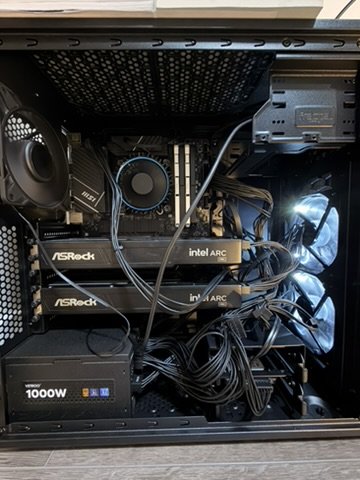
How the two cards connect
The i7-14700F has 20 PCIe lanes. Sixteen go to the one full-length slot and four go to the NVMe drive. I couldn't find a DDR4 board for this socket that splits those sixteen lanes into two x8 slots; that split shows up on high-end DDR5 boards. So the second card lives on the chipset.
| Card | Slot | Link | Shared with |
|---|---|---|---|
| Card 1 | CPU slot | PCIe Gen4 x8 | Nothing |
| Card 2 | Chipset slot | PCIe Gen4 x4 | The chipset's uplink, with the network card and other onboard devices |
The B60 is an x8 card, so card 1 gets everything it can use. Card 2 gets half the lanes and shares the chipset's link to the CPU.
That sounds worse than it is. Both large models are split across the cards by layers: card 1 holds the first part of the network and card 2 the rest. For each token, only a small block of activations crosses from one card to the other. The weights never move once they're loaded. Where you do feel the x4 link is loading a model onto card 2, which takes longer than loading card 1. After that, it doesn't matter.
If you're shopping, this is the useful takeaway: a cheap board with one CPU x16 slot and a chipset x4 slot is enough for two cards running a layer split.
Reading the real link speed
When I first checked the links, Linux told me both GPUs were running at 2.5 GT/s x1, which is PCIe Gen1 with a single lane. That would have been a disaster, and it's wrong.
Arc cards carry their own small PCIe switch. The GPU sits behind it, and the link between the switch and the GPU is internal to the card. That internal link reports Gen1 x1 whatever the slot is doing. The slot link that matters is one level up, on the switch's upstream port. You can walk the tree in sysfs:
# Walk from the GPU up to the root port and print each link
dev=/sys/bus/pci/devices/0000:03:00.0
p=$(readlink -f "$dev")
while [ -f "$p/current_link_speed" ]; do
  speed=$(cat "$p/current_link_speed"); width=$(cat "$p/current_link_width")
  echo "$(basename "$p")  $speed x$width"
  p=$(dirname "$p")
done
On my card 1, that prints:
0000:03:00.0  2.5 GT/s PCIe x1    GPU, behind the card's switch
0000:02:01.0  2.5 GT/s PCIe x1    switch, downstream port
0000:01:00.0  16.0 GT/s PCIe x8   switch, upstream port: the slot link
0000:00:01.0  16.0 GT/s PCIe x8   CPU root port
16 GT/s is Gen4, and x8 is the card's full width. Card 2 shows the same pattern ending in 16 GT/s x4 at the chipset port. If you only look at the GPU itself, you'll misread every Arc card you own.
The software, from the driver up
| Layer | What runs | Why |
|---|---|---|
| OS and kernel | Ubuntu 26.04 LTS, kernel 7.0 | Battlemage support in the in-kernel driver |
| GPU driver | xe (in the kernel) | No out-of-tree driver to maintain |
| Compute runtime | Intel oneAPI, SYCL and Level Zero, inside Docker images | Nothing extra installed on the host |
| 35B and 27B | llama.cpp, SYCL build, official image pinned by digest | Mature, OpenAI-compatible server |
| 125B | Strata, SYCL engine built for Battlemage | Built to run large mixture-of-experts models across VRAM and system RAM |
| In front | A small router with one endpoint | Every app talks to one address; one model is loaded at a time |
Two decisions made the biggest difference.
SYCL instead of Vulkan. I started with llama.cpp's Vulkan backend on Mesa, because it ran without installing anything. Moving to the SYCL build in Docker made generation about 2.5 times faster on the 35B and about 1.9 times faster on the 27B. Same cards, same models.
Keep the host clean. The GPU runtime lives in container images, pinned by digest, and the host only needs the kernel driver. Upgrading or rolling back the runtime is an image change, not a package change. When something breaks, I know which layer moved.
The models and what each one is for
| Model | Size on disk | Engine | Speed I see | What I use it for |
|---|---|---|---|---|
| Qwen3.6-35B-A3B, Q4_K_M | about 20 GB | llama.cpp | about 73 tok/s | Fast work: quick answers, classification, voice replies, anything that needs a picture read |
| Qwen3.8-27B, Q4_K_S | about 16 GB | llama.cpp | slower, dense | When quality matters more than speed |
| Qwen3.8 Flash Next, 3-bit (IQ3_XXS) | about 77 GB | Strata | about 40 tok/s writing, 60 on code, 1,000+ tok/s reading the prompt | The daily runner |
The 35B is a mixture-of-experts model with about 3B parameters active per token, which is why it's so fast. The 27B is dense: every parameter works on every token, so it's slower, and on some tasks it's more careful.
The 125B is the one I leave running. It runs opencode when I code, it handles my email triage and my finance work, and it takes anything I'd rather keep on my own hardware.
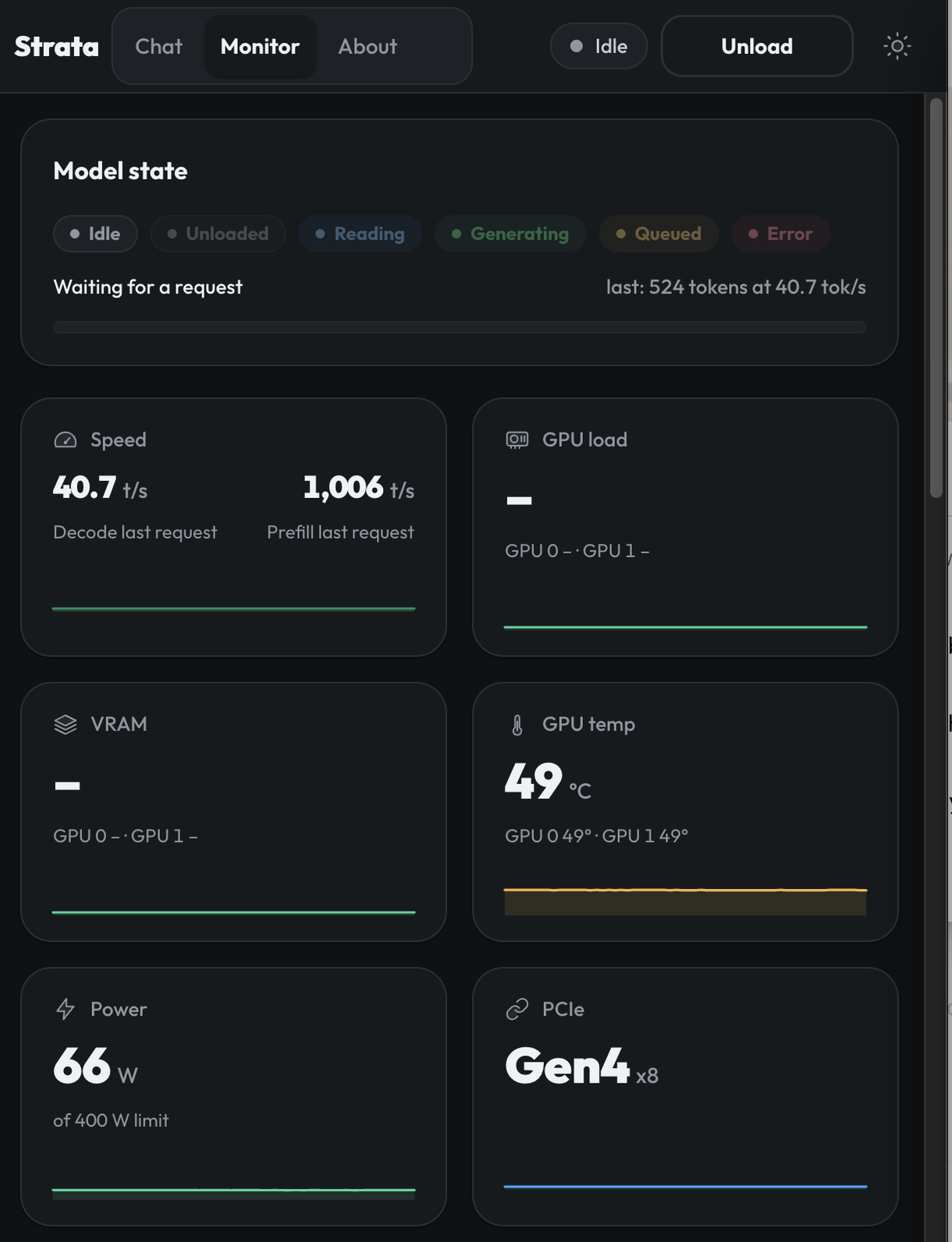
Why a 125B model fits in 48 GB
It doesn't, not all of it. The 3-bit file is about 77 GB and the two cards hold 48 GB. It works because of how the model is built.
Flash Next has 125B parameters in total, but it reads only about 6B of them for each token. Most of the model is a large set of experts, and each token only visits a few of them. Strata takes advantage of that. It splits the layers across both cards (the first 31 on card 1, the rest on card 2), keeps about 87% of the experts in VRAM, and holds the remainder in a 16 GB mirror in system RAM. When a token needs an expert that isn't on a card, it comes over PCIe from RAM.
That's also where the DDR4 limit shows. Dual-channel DDR4-2667 gives about 43 GB/s, far below what a GPU reads from its own memory. Because only a small share of the experts live in RAM, the slow path is used rarely, and the speed stays around 40 tokens a second.
Lessons that cost me time
The GPU job timeout. The xe driver gives each GPU job 5 seconds by default. Very long prompts, and copying a large model into VRAM at load time, can run past that. The result was a hung GPU and a lost device, which looked like a driver bug. Raising the timeout to 10 seconds on every engine fixed it. I set it at boot from a one-shot systemd unit:
for f in /sys/class/drm/card*/device/tile0/gt0/engines/{ccs,bcs,rcs}/job_timeout_ms; do
  [ -w "$f" ] && echo 10000 > "$f"
done
Start order matters. Strata sizes its expert cache once, at start-up, from the VRAM it finds free. One morning a model switch started Strata eight seconds before the previous server had released card 1. Strata built a 3 GB cache instead of an 18 GB one and dropped to about 7 tokens a second. Nothing errored. The fix was to make the service wait until the cards are free before it starts.
Load the big model first. When a large model loaded after smaller services had already taken memory, part of it landed in system RAM instead of VRAM, and speed fell sharply. Loading the main model first, then everything else, kept it fully on the cards.
Turn thinking off for agents. With reasoning on, some of these models spent their whole output budget thinking and returned an empty answer to the agent. For tool-calling work, I turn thinking off on the server and let a client ask for it when it needs it.
What still goes to Claude
Claude does the heavy lifting: long, multi-step agent work, hard reasoning, and anything where being wrong costs more than the subscription. Local models are good, and they're not at that level for my work.
What the local stack changes is the everyday load. Coding with opencode, sorting email, finance and private notes now run on hardware I own, and that data never leaves the house. My goal isn't to replace Claude. It's to move enough of the routine work local that I can step down to the Pro plan.
What's next
More VRAM is the cheapest speed-up, and a third B60 is the cheapest way to get it. The limit is lanes: this CPU has no room for a third card at a useful link width. The options I'm weighing are a board and CPU with more lanes that still take my DDR4 sticks, or a third card outside the case. When that's done, it'll be its own post.
Sources and credits
- llama.cpp, by ggml-org and contributors. I run the official SYCL image.
- Strata, by Niko1221, MIT licence.
- Qwen3.8 Flash Next, GSQ-RCO GGUF, quantized by ISTA-DASLab.
- Qwen3.8-27B GGUF, quantized by bartowski. The Qwen models are by the Qwen team.
- opencode, the open-source coding agent.
- Intel oneAPI, Level Zero and the
xekernel driver, by Intel and the Linux kernel community. - Prices are my own check of Canadian retailers in October 2026. Speeds are measured on this machine and will differ on yours.