AI visibility: which tool can actually see your AI?
An AI inventory that only lists what you approved misses most of what's running. The AI Visibility Map names the tool that sees each kind of AI in each part of the estate, and turns the gaps into an action list. With what Microsoft Defender, Palo Alto, CrowdStrike, Tanium and others can discover today, a worked example and a free template.
- Drawn by
- Blue Marshal
- Post
- 3 of 3
- Issued
- Reading time
- 14 min
- Revision
- A
Ask a security team what AI is running in their environment and you'll usually get the list of approved tools. That list is the easy part. The hard part is everything nobody approved: a local model on a developer's laptop, a copilot agent a business user published on a Friday, an MCP server in someone's IDE config with a token to the ticketing system, a free-tier AI account signed up with a corporate email.
The better question is narrower and more useful: for each kind of AI asset, in each part of the estate, which tool can actually see it? If you can't name the tool, you don't have visibility, you have hope.
The AI Visibility Map is the worksheet I use to answer that question. This post explains how it works, walks through a fully worked example for a fictional company, shows what Microsoft Defender and other vendors can already discover, and ends with the free template.
The grid
The map crosses five classes of AI asset (the rows) with four environments (the columns), plus one governance band at the foot.
| Row | AI asset class | The question it answers |
|---|---|---|
| 01 | Models and model endpoints | Which models run or are called, by whom, and with what data? |
| 02 | Agents and copilots | What acts on its own, under whose identity, with what permissions? |
| 03 | MCP servers and tool connectors | What can an AI reach into, and who approved that connection? |
| 04 | AI pipelines and data flows | Where does your data go to be embedded, trained on, or retrieved? |
| 05 | AI tooling, runtimes and supply chain | What AI code and dependencies are installed, and can you trust them? |
| GOV | Governance and assurance | For whatever runs here: is it approved, is it audited, and can you enforce policy? |
The four environments are the columns:
- On-premises: workstations and servers, managed and unmanaged, including VDI, containers and engineering segments.
- Cloud platforms: Azure, AWS and Google Cloud, including managed AI services.
- SaaS, internal: AI inside the apps you license, such as Microsoft 365 Copilot and the agents people build in it.
- SaaS, external and shadow: third-party AI reached over the network. Unsanctioned unless your policy says otherwise.
Sanctioned versus shadow AI is the column axis, so it isn't repeated as rows. That keeps the map to 24 cells, which is small enough to fill in a week.
What a cell asks for
Every cell comes with a short list of what to look for in that environment. Three examples show how different the same row looks across the columns.
| Cell | What to look for |
|---|---|
| Models, on-premises | Local runtimes such as Ollama, LM Studio and llama.cpp; model weight files on disk; listeners on ports 11434 and 1234; sustained GPU use; self-hosted inference servers like vLLM, Triton and TGI. |
| Agents, SaaS internal | Copilots and agent builders in your suite, including agents and flows that end users publish; who published each one, and what knowledge and connectors it holds. |
| MCP, SaaS external | Desktop and IDE clients connecting to remote MCP endpoints on the internet; egress to MCP and SSE endpoints; tokens issued to external MCP servers. |
The full list for all 24 cells is in the template.
The scoring rules
Each cell gets one of four coverage states.
| Coverage | Meaning |
|---|---|
| Full | Discovered, monitored, and the logs land in the SIEM |
| Partial | Some assets or some signal only |
| None | Confirmed blind spot |
| Unknown | Not assessed yet, or the tool is unverified |
Five rules keep the scoring honest. They're the part of the map that does the real work.
- A score needs a named tool. Every cell scored Full, Partial or None must name the tool behind it. A score with no tool is not coverage.
- Unverified tools get a question mark. If a tool is deployed and could cover the cell but nobody has confirmed it, write the tool name with a
?in front and leave the cell Unknown until someone checks. - Blocking alone is Partial. A tool that blocks AI traffic but keeps no inventory and no logs gives you control without visibility.
- No SIEM, no Full. If a tool's logs don't reach the SIEM, its coverage is Partial, however good the tool is.
- Unknowns don't count. The score is (Full + half of Partial) divided by the cells you assessed. Unknown cells are left out, so a map full of Unknowns isn't a good score. It's an unfinished map.
The tool register also records how deep each tool goes: Discover (it sees the asset exists), Detect (it sees what the asset is doing), or Control (it can stop or restrict it). Most organizations find their tools stop at Discover for anything AI-specific.
A worked example: Northbridge Corp
Northbridge Corp is a fictional mid-size company. Every tool, score, gap and decision below is invented for teaching.
Scope. Microsoft 365 Copilot is the only sanctioned AI service, in a 200-seat pilot. Everything else, including AI features inside products Northbridge already licenses, is unsanctioned by policy. The estate is about 2,400 endpoints and 180 servers, a small Azure footprint, a customer portal, one Microsoft 365 tenant, and a recently acquired subsidiary that still runs its own network.
Coverage at a glance
| AI asset class | On-premises | Cloud | SaaS internal | SaaS external / shadow |
|---|---|---|---|---|
| 01 Models and endpoints | Partial | Partial | Unknown | Partial |
| 02 Agents and copilots | Partial | Partial | Partial | Unknown |
| 03 MCP and connectors | Unknown | Partial | Partial | Unknown |
| 04 Pipelines and data flows | Unknown | Partial | Partial | Partial |
| 05 Tooling and supply chain | Partial | Partial | Unknown | Partial |
| GOV Governance | Partial | Partial | Partial | Unknown |
Northbridge assessed 17 of 24 cells. All 17 are Partial and 7 are still Unknown. Nothing is Full and nothing is a confirmed None. The score is 50%, and it tells the real story: Northbridge can half-see its AI everywhere and fully see it nowhere.
What the tool register shows
Northbridge isn't short of tools. It runs Defender for Endpoint and Defender for Servers, Defender for Cloud, a next-generation firewall with URL filtering, Purview, the Microsoft 365 and Power Platform admin centres, and Sentinel. The register explains why that still adds up to Partial everywhere.
- The endpoint agent sees processes, not agents. It can report that an agent binary ran. It can't say whose identity the agent used, what it was allowed to do, or what it connected to.
- The firewall sees destinations, not content. It reports traffic to model API domains, but not what data left, and not which user sent it without joining to identity logs.
- The SIEM receives the data and nothing reads it. Copilot audit logs and Defender telemetry reach Sentinel, but there are no AI-specific analytics rules.
- Two rows in the register point at holes. The subsidiary's firewall is run by its own IT and its logs never reach Sentinel. And there's no CASB, so shadow AI can be detected but not governed.
The gaps and the decisions
Every Unknown and every weak Partial became a gap with an owner and a date. The top five:
- Shadow AI can be seen but not stopped. Detection without enforcement isn't a control. Decide the enforcement path: a CASB, tenant restrictions, or firewall blocking with an exception process.
- The subsidiary has no AI visibility at all. Onboard its endpoints to Defender, ship its firewall logs to Sentinel, and decide what AI use is allowed there until then.
- No tool gives an MCP inventory. MCP visibility depends on hunting queries nobody has written yet. Write them, schedule them, and alert on new MCP clients and servers.
- External agents could be granted rights in the tenant unnoticed. Run an OAuth consent-grant review for AI apps and make it recurring.
- Copilot audit data lands and nothing reads it. Build the first three rules: a new agent published, unusual Copilot data access, and a first-seen AI domain in egress.
The map ends with the decisions only leadership can make. For Northbridge there are six, and the third one explains the rest: assign an owner for AI visibility. Every gap on this map is unowned today, which is why they're all still open.
What your tools may already see
Before you buy anything, check what your existing tools found while you weren't looking. Several vendors shipped AI discovery in 2026, and some of it is already in licences people own.
Microsoft Defender: the AI agents inventory
In the Microsoft Defender portal, Assets, then AI agents (security.microsoft.com/ai-inventory) brings cloud and local AI agents into one inventory, on two tabs.
- Agents lists cloud agents: agents built with Copilot Studio, Microsoft Foundry and Microsoft 365, plus supported non-Microsoft platforms through the Agent 365 registry. Each one shows its platform, publish status, tools, MCP servers, alerts and, with the right licence, a risk level.
- Local agents lists AI agents that Defender for Endpoint found running or installed on devices. Microsoft's support list covers about 60 of them on Windows and macOS, including Claude Code, Claude Desktop, Codex, Cursor, GitHub Copilot, Gemini CLI, Ollama Desktop, LM Studio, OpenCode and OpenClaw. For many of them it also reports the MCP servers they're configured to use.
Here's the Local agents tab in my own lab, with device names and IDs replaced:
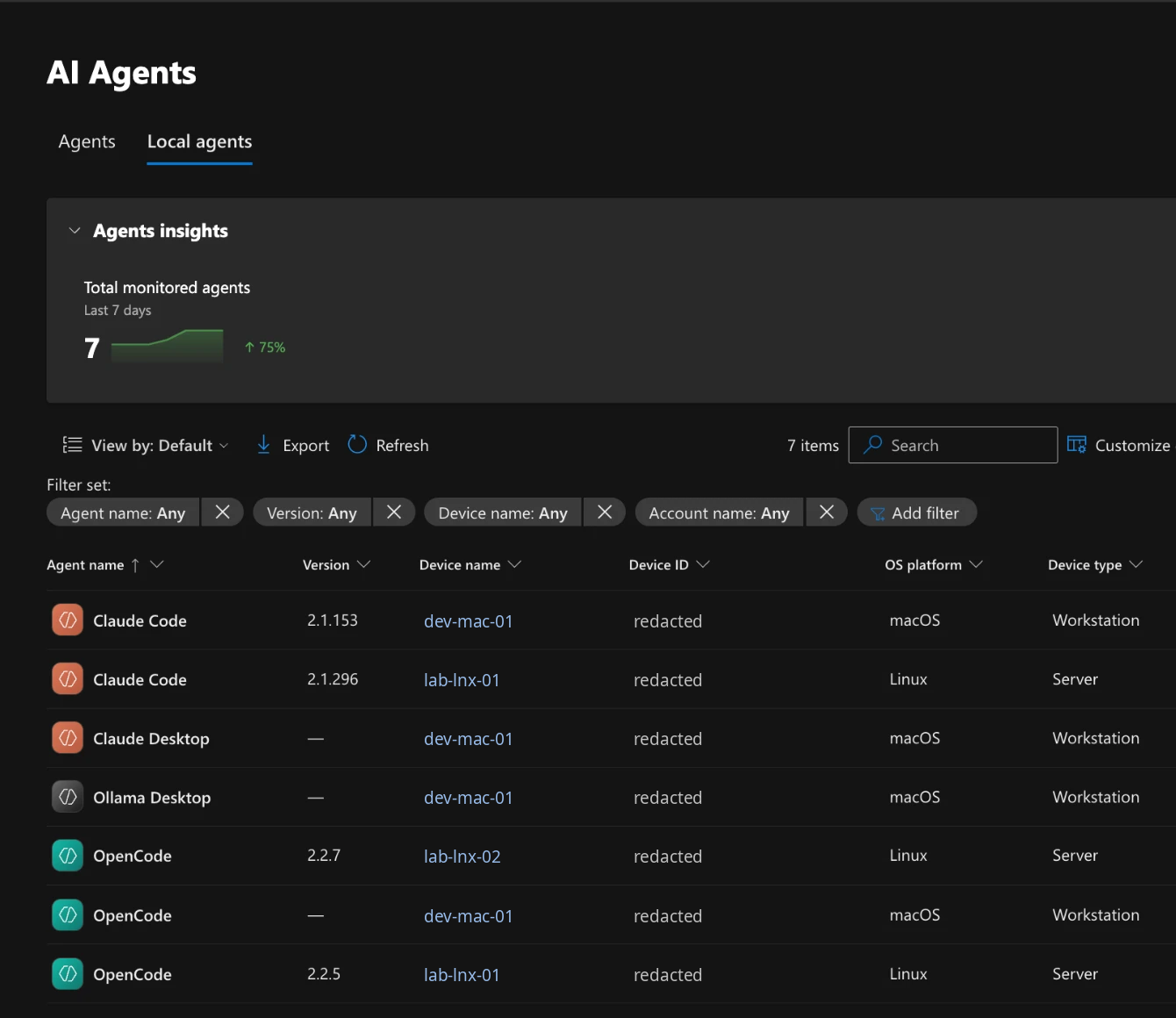
Each row is one agent on one device under one account, with the version, operating system, device type and the number of remote and local MCP servers. The detail pane goes further: the agent's vendor and model, the process hosting it, whether that process is trusted, and whether the agent approves its own actions without asking. That last field is the one I'd look at first. An agent that auto-approves runs tools with whatever the user's account can reach.
What it takes, from Microsoft's documentation:
| Need | Detail |
|---|---|
| Licence for the inventory | Defender for Endpoint Plan 2 (included in Microsoft 365 E5 and E7) |
| Licence for risk levels and recommendations | Microsoft 365 E7, or Agent 365 with Defender for Endpoint Plan 2 |
| Devices | Onboarded to Defender for Endpoint, on a supported Windows or macOS version |
| MCP server discovery | Defender Antivirus in active mode with real-time protection |
| Cloud | Commercial cloud only. Sovereign and national clouds aren't supported |
Three things to keep in mind. A running process is enough to create an entry, so an entry doesn't prove anyone used the agent. Installing an agent doesn't guarantee an entry either. And the documented support is Windows and macOS: in my lab it also listed Claude Code and OpenCode on two Linux servers, but Microsoft doesn't document native Linux yet, so treat that as a bonus rather than a promise.
On the map, this fills cells that were hard to fill before: models, agents and MCP connectors on endpoints (rows 01 to 03, on-premises), and agents in your Microsoft tenant and cloud (row 02, SaaS internal and cloud). It doesn't see AI used through a browser, data flows (row 04) or most of the supply chain (row 05). Northbridge's map was scored before this shipped. With Defender for Endpoint Plan 2 and active-mode antivirus, its gap 3 (no MCP inventory) and its on-premises agent cell would both be re-scored. That's why the map has a re-score date.
What other vendors offer
Every major security vendor now sells some form of AI discovery. They look from different places, and that decides which cells of the map they can fill.
| Vendor | Offering | Looks from | What it finds | Status as of November 2026 |
|---|---|---|---|---|
| Microsoft | Defender AI agents inventory, Agent 365 | Endpoints (Windows, macOS) and Microsoft's agent platforms | Local agents and their MCP servers; Copilot Studio, Foundry and Microsoft 365 agents | Local discovery generally available on Windows and macOS |
| Palo Alto Networks | Prisma AIRS 3.0; Agentic Endpoint Security from the Koi acquisition | Cloud, SaaS, endpoints and browsers | Agents, models, MCP servers and plugins; a Cortex XDR module for AI software on endpoints | AIRS 3.0 announced March 2026; Koi acquisition closed April 2026; AI Agent Gateway in limited preview |
| CrowdStrike | Falcon Guardian; AI Agent Discovery in Falcon Shield; AI discovery in Falcon for IT | Endpoint sensor, SaaS connectors, DNS telemetry | Known and unknown agents, local model runtimes, SDKs and agent frameworks; agents in SaaS platforms | Falcon Shield discovery generally available from March 2026 |
| Tanium | Guardian AI tools dashboard in the Tanium Console | Managed endpoints | MCP servers configured in tools like VS Code and Claude Code, local inference engines, OpenClaw, and local model files such as .gguf, .safetensors and .onnx | Shown April 2026; the model file audit needs Threat Response and Index |
| Zscaler | AI Asset Management; AI Broker with an agent registry | Network (its security service edge) and endpoints | AI apps, models, infrastructure and agents; on endpoints, agent config files, MCP servers and model files | AI Broker announced at Zenith Live 2026 |
| Netskope | AI Command Center; AI discovery in the Netskope Client; Agentic Broker | Endpoint client, network proxy, and servers through an eBPF agent | Agents, local model runtimes (Ollama, LM Studio, Jan, GPT4All), local MCP servers, browser and IDE AI extensions, and MCP traffic | Announced June 2026, rolling out through Q3 2026 |
| Wiz | AI-SPM and AI-BOM | Cloud APIs, agentless (AWS, Azure, Google Cloud, Kubernetes) | AI services, models, agents, MCP use, and AI SDKs and libraries | Generally available |
| SentinelOne | Prompt Security for agentic AI | SaaS, desktops, browsers and developer tools | Agents and MCP servers, including shadow ones; an MCP gateway to govern them | Vendor material only |
Read the table against the map's columns, and the pattern is clear.
- Endpoint tools (Defender, CrowdStrike, Tanium, the Netskope and Zscaler clients) fill the on-premises column: local runtimes, agents, MCP configs and model files.
- Network tools (Zscaler, Netskope, Palo Alto) fill the external and shadow column: who calls which AI service, and which MCP endpoints are reached over the internet.
- Cloud posture tools (Wiz, Palo Alto, Defender for Cloud) fill the cloud column.
- SaaS and agent platform connectors (Microsoft, CrowdStrike Falcon Shield) fill the SaaS internal column.
No single product fills the grid, which is why the map asks you to name a tool for every cell. Two cautions. Almost everything in this table is the vendor's own description, and I haven't found independent tests comparing them. And these products are changing fast, so check the vendor's current documentation before you score a cell against one of them.
Run it in a week
You don't need a project to start. You need a scope paragraph, your tool list and a few hours with the people who run those tools.
| Day | Work |
|---|---|
| Monday | Write the scope paragraph: approved AI services, estate size, cloud footprint, tenants, and any segments that are run separately. List every tool that could give AI visibility today. |
| Tuesday | Walk the rows for on-premises and cloud. For each cell, name the tool that answers the question, or write ? before a tool nobody has confirmed. |
| Wednesday | Walk the two SaaS columns and the governance band with whoever administers your suite and your identity platform. |
| Thursday | Test the ? cells. Install a known local runtime on a test machine and check that your tools see it. Publish a test agent and check that it shows up. Score each cell. |
| Friday | Turn every Unknown and weak Partial into a gap with an owner and a date. Write the decisions for leadership. Set the date to score the map again. |
Re-score on a schedule. Coverage drifts as fast as AI adoption does.
Download the map
The template and the worked example each come in three formats that hold the same map.
| File | Blank template | Northbridge example |
|---|---|---|
| Excel: dropdowns, live scores, tool register, gaps, decisions | ai-visibility-map.xlsx | ai-visibility-map.xlsx |
| Markdown: fillable tables that render on GitHub | ai-visibility-map.md | ai-visibility-map.md |
| HTML: a two-page printable map you can type into | ai-visibility-map.html | ai-visibility-map.html |
The HTML version keeps what you type in your own browser only, with export and import to a JSON file. It makes no network requests. The Markdown version is good for keeping the map in a repository next to your detection content, with its history in git.
Where this fits
Visibility comes before maturity. In the SANS AI Security Maturity Model, one of the steps out of Stage 1 is an inventory of the AI tools in use, and Stage 3 expects a complete AI asset inventory with owners. This map is how I get from the first to the second: it shows what the inventory is missing and which tool would close each gap.
Sources and credits
- The AI Visibility Map framework, template and the Northbridge example are by Blue Marshal. Northbridge Corp is fictional.
- Microsoft: AI agent inventory, Discover local AI agents and the AI agent support matrix, Microsoft Learn, updated November 2026. The screenshot is from my own lab tenant, with device names replaced and IDs redacted.
- Palo Alto Networks: Prisma AIRS 3.0 (Help Net Security, March 2026) and completion of the Koi acquisition (April 2026).
- CrowdStrike: Falcon Guardian and AI agent discovery across endpoints, SaaS and cloud.
- Tanium: Inside the Guardian AI tools dashboard (April 2026).
- Zscaler: AI security suite and AI Asset Management (Help Net Security, January 2026).
- Netskope: AI Command Center (June 2026) and Netskope Client AI discovery.
- Wiz: Securing AI agents with Wiz AI-SPM.
- SentinelOne: Prompt Security for agentic AI.
- Related frameworks: MITRE ATLAS for AI threats, the NIST AI Risk Management Framework for AI risk, and the OWASP AI Exchange and OWASP GenAI Security Project for AI security controls.
- Product names belong to their owners. Vendor capabilities are as each vendor describes them, checked in November 2026. None of this is a recommendation.
- The spreadsheets are generated with openpyxl.